I have terrible self-control when it comes to going down the internet rabbit hole. Over the years I have found it necessary to have an external helper to keep me on track. I’ve used a browser blocker for years, but hated the fussiness of the app and the limitations. Then the DigitalZen app dropped into my inbox. It took away all of the inflexibility, and has kept me more on track across the board.
There are two ways to use DigitalZen: blocking and focus. Both options allow you to save your configuration.
Blocking
Blocking is typically about keeping you off sites and apps. DigitalZen does that. Unlike my previous solution (LeechBlock), DigitalZen can also monitor my apps that I am using.
Blocking can be set up for apps or websites – or both. It comes with a preset list of suggestions that can be taken as is or modified.
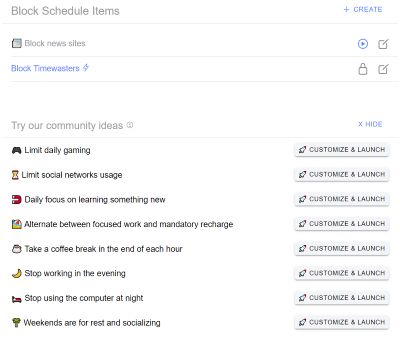
When you create a new blocker, you have the ability to add both apps and sites.
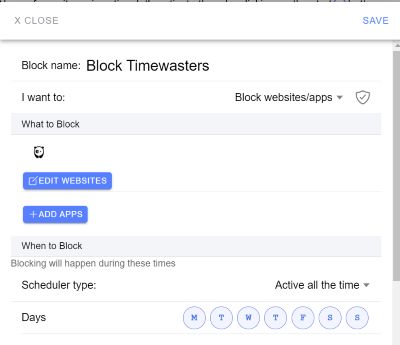
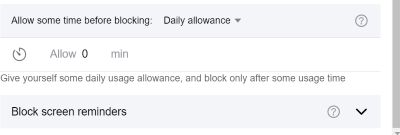
You can block by day of the week, time of day, or customize it as much as you want. You can even set an amount of time before blocking – a digital allowance.
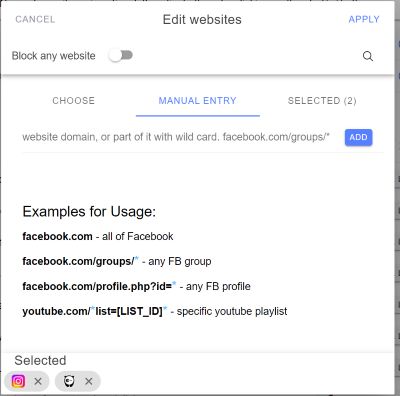
The screens walk you through the options on how to set them up. With websites, it tells you how to block everything – or just some things.
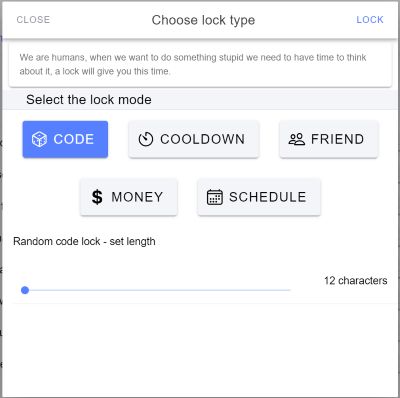
When you turn on the block, you have the option of locking it. This will require you to take further action before it unlocks. There are 5 options, which include typing in a code (you choose the length), a cooldown time, sending the code to a friend, sending money to DigitalZen or keeping it locked until a date and time.
Allow Mode Not only can you block things with this app, but you can set it up so that you allow things. This would be where you allow certain apps to be available to you during a period, like working hours. You can schedule this as well so that it automatically blocks everything but the things you have chosen to allow.
Focus
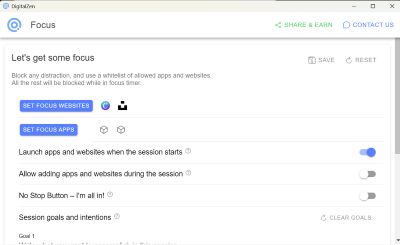
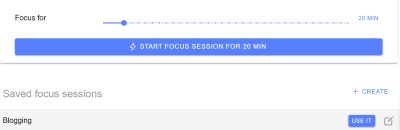
Focus mode is blocking for a short period of time. You can set up the apps and/or websites you need to work, and then block everything else for a chosen time period. You can even state a goal of what you are working on – and if you get distracted, the app will remind you.
Overall Thoughts
I’ve used Leechblock and Freedom for years to do what DigitalZen does. Leechblock is clunky, and you have to transfer your block list from browser to browser. DigitalZen does that for you. Set it up on the app, and it goes to the browsers you have the extension installed on.
Freedom is still a good app, but all of the functionality is covered by DigitalZen. The only advantage that Freedom has is that you can use it on iOS and Android devices. DigitalZen is not there yet.
Pricing
DigitalZen does have a free option so you can take it for a spin. Its also a bargain at $3 per month, or $119 for lifetime access. Check out all the details at the DigitalZen website.
In Conclusion
I am impressed by DigitalZen. It made blocking my timewasters much easier than it had ever been before. And that has saved me a ton of time.
Disclosure: DigitalZen gave me a license to the product in order for me to evaluate it.